PER32 Ultra Hybrid Watch Face
PERSONA Watch FacePersonalization
4.167.00 Reviews
- Version
- Varies With Device
- Installs
- 10.00K
- Age Rating
- Everyone
Screenshots
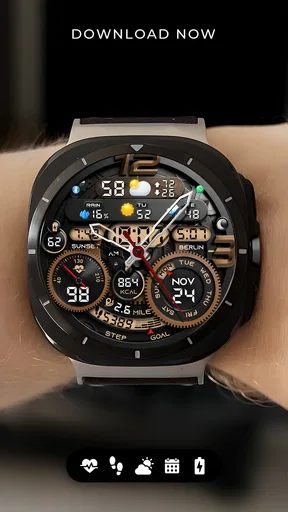
Our Review of PER32 Ultra Hybrid Watch Face
 Analysis by Appyee
Ever thought about sprucing up your smartwatch with something that's both stylish and functional? Well, let me introduce you to the PER32 Ultra Hybrid Watch Face. As someone who loves customizing their gadgets, I was excited to dive into this app and see what it offered. I spent some time fiddling around with it, and here’s my take.
A practical routine for a hybrid face
I find a watch face works best when I decide what I want to check at a glance before I start changing its appearance. With an analog-and-digital layout, the useful question is not simply “Which look do I like?” but “What information do I reach for without opening another screen?” I’d begin with the time as the visual anchor, then keep only the extra details I expect to use during an ordinary day.
That approach matters on a small display. A face can feel polished in a customization menu and still become busy on the wrist if every available slot is filled. I recommend trying a restrained arrangement first, wearing it through a normal morning, and then changing one element at a time. It’s an easy way to tell whether an addition genuinely saves a glance or merely makes the design harder to read.
For example, while getting ready to leave, I might want to read the time quickly and glance at a daily activity detail without navigating elsewhere. Later, at a desk, the same face can serve as a quiet visual check rather than something I keep tapping. The best setup is the one that supports those small habits without turning the watch into a miniature dashboard I have to study.
First Impressions
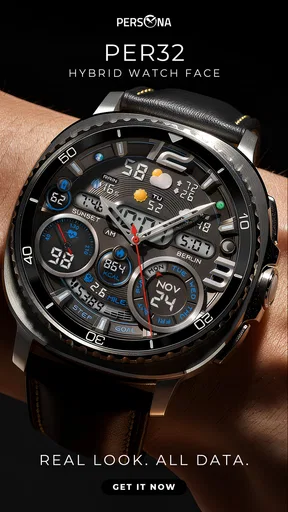
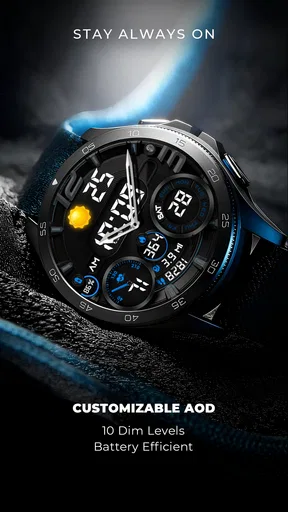
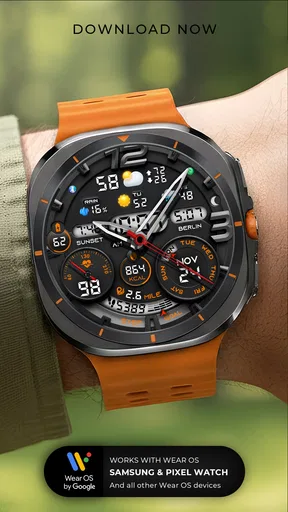
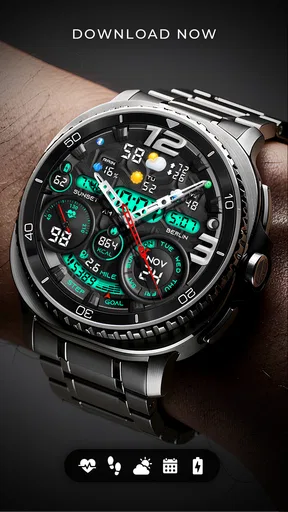
The first thing that struck me about the PER32 Ultra Hybrid Watch Face is its sleek design. It's not just another watch face; it’s a whole experience. Imagine combining the charm of an analog watch with the convenience of digital features. The app nails this hybrid concept beautifully. As soon as I installed it, my smartwatch looked like it had received a major upgrade.
Design and Customization Options
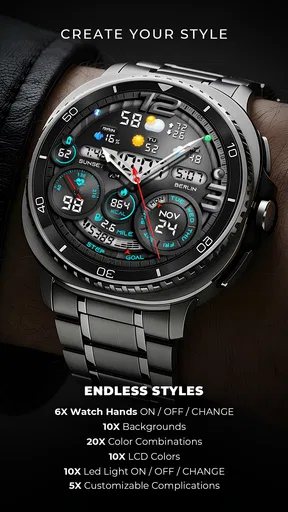
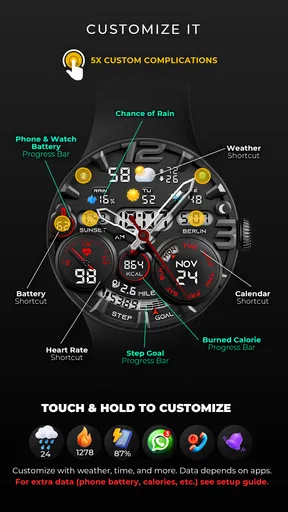
One of the coolest things about this watch face is its customization options. If you’re like me and love to tweak things to your liking, you’re in for a treat. The app allows you to choose from a variety of colors, styles, and complications. Whether you’re going for a minimalist look or something more vibrant, there’s something here for everyone.
Setting it up was a breeze. The interface is intuitive, and even if you’re not tech-savvy, you’ll find navigating through the options quite easy. I particularly loved how you can mix and match different elements to create a watch face that’s uniquely yours.
Choosing what earns a place on the screen
My most useful customization tip is to treat each complication as a trade-off: it should answer a question I regularly have, or it does not need to occupy attention. A step count can make sense for someone who checks activity throughout the day; weather information may matter more to someone planning walks or commutes. Those are different routines, so I would not assume that copying another person’s layout will make the face more useful.
I also like to judge a color choice in the conditions where I actually wear the watch, not only in the setup view. A strong contrast can help quick reading, while a more subdued palette may suit a formal setting better. If I switch between work and weekends, I’d favor a look that feels comfortable in both rather than spending time changing it whenever the occasion changes.
There is a practical limit to customization: adding options is not the same as improving clarity. When a face feels crowded, removing one complication is often a better fix than repeatedly adjusting colors or styles. That small reset helps preserve the point of a hybrid design: familiar analog timekeeping with selected digital information close at hand.
Functionality and Performance
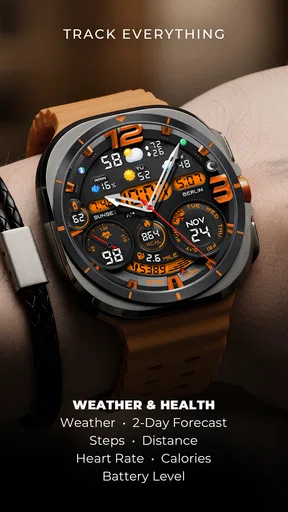
Now, let’s talk about functionality. This isn’t just a pretty face. The app is packed with features that enhance your smartwatch experience. From weather updates to step counters, everything is seamlessly integrated. I found the transition between different screens smooth and without any lag—something that’s crucial for an app like this.
The battery consumption is also quite efficient. I've had watch faces in the past that drained my battery faster than you can say "charge," but with this one, my smartwatch lasted just as long as it usually does.
Small habits that make it easier to use
Once I’ve settled on a layout, I try to leave it alone long enough to learn where my most-used information sits. That consistency makes glances more automatic, especially when I’m carrying something, walking, or checking the time between tasks. If I keep rearranging the face, I lose that familiarity and have to scan the screen again.
A useful everyday pattern is to check the watch at natural pauses rather than repeatedly waking it for information I do not need. Before heading out, I can use the face for a quick time and activity check; during a busy stretch, I can let it remain a timepiece instead of treating every complication as a prompt to interact. This is a modest benefit, but it is the kind of routine that makes a customizable face feel purposeful.
Battery life is also worth judging across a normal day, not from a brief first impression. Display behavior and the watch itself affect the overall experience, so I would compare the result with my usual setup over similar days before deciding that a new face has changed endurance. If battery life is the priority, a simpler face may be a more sensible choice than filling every available space.
User Experience
If you’re worried about the learning curve, don’t be. The app is designed to be user-friendly. It took me less than five minutes to get everything set up and running. The developers have clearly put a lot of thought into making this app as accessible as possible.
I also appreciate the attention to detail. The animations are smooth, and the transitions are simply a joy to watch. It’s the little things that make a big difference, right?
Where it fits among other watch faces
Compared with a plain digital face, this hybrid style gives the display a more traditional watch character while keeping digital information within reach. Compared with a strictly analog option, it can suit someone who wants more than hands and markers at a glance. The trade-off is that a simpler alternative can be easier to read if all I need is the time, and another face may suit a person who wants a very specific information layout or a completely different visual style.
This is a personalization app for Wear OS, made by PERSONA Watch Face. Its focus is the watch display itself, so I would choose it for changing the look and at-a-glance experience, not as a replacement for a broader smartwatch tool. It has an Everyone content rating, and its 4.4 average from around 260 ratings suggests a generally positive response. That is useful context, but I would still make the decision based on whether the hybrid presentation suits my own wrist and routine.
The face is priced at $2.99, so I’d think of the purchase as paying for a particular style and customization experience rather than expecting a large standalone app. It has over 10,000 installs, and it was released on December 14, 2024. Those details can help place it in context, but they do not tell me whether its design will feel right on my particular watch; trying a restrained setup and checking readability is more useful than relying on popularity alone.
Limits to keep in mind
A hybrid face is not automatically the right choice for everyone. If you prefer a bare display, want the simplest possible glance, or rarely use complications, its additional choices may feel unnecessary. People who value a highly specialized data presentation should also compare it with alternatives built around that priority rather than assuming a general-purpose watch face will match every workflow.
There is also a difference between selecting an item in a watch-face editor and getting the precise behavior you expect from it in daily use. I’d check that the details I choose are readable and useful on my own Wear OS watch, then remove anything that distracts or does not earn its space. That is more reliable than building an elaborate arrangement before wearing it outside the setup screen.
Another sensible question is whether the purchase suits the way I change my watch. If I enjoy settling on one design and keeping it, the one-time choice can make sense as a personal upgrade. If I switch faces constantly or mainly want a no-frills time display, I would pause before paying and consider whether a simpler alternative fits better.
Why You Should Try It
So, should you give the PER32 Ultra Hybrid Watch Face a shot? Absolutely. If you’re looking to add a touch of elegance and functionality to your smartwatch, this app is a no-brainer. It’s like having the best of both worlds—classic design with modern features.
Overall, I’m pretty impressed. It’s not just about telling time; it’s about making a statement. And for someone who loves personalizing their tech, this watch face has been a game-changer. So, if you're ready to take your smartwatch to the next level, this app might just be what you’re looking for.
Who I’d recommend it to
I think it is best suited to Wear OS owners who enjoy personalizing their watch and want a traditional visual foundation with selected digital details. It is especially appealing if you like adjusting colors and complications until the display fits your habits, then keeping that arrangement consistent. Someone who already checks activity or weather on the wrist may get more from those choices than someone who only glances at the time.
I would skip it if I wanted a purely minimalist face, did not care about customization, or expected a watch face to transform the watch’s broader capabilities. A face can organize what appears on the display; it cannot make a busy layout automatically useful. In that case, a simpler built-in option or a different style may be the better everyday fit.
A considered final choice
Before choosing, I would ask myself three practical questions: Do I prefer analog styling? Which information do I genuinely check on my wrist? Will I keep the same arrangement long enough to benefit from it? If the answers point toward a hybrid display and a small set of useful details, this is a persuasive personalization purchase. If they point toward simplicity or a very particular information workflow, I would look elsewhere rather than pay for options I am unlikely to use.
My recommendation is positive, but it is tied to that distinction. The face’s strongest appeal is not that it should suit every watch owner; it is that it lets someone who likes a classic-meets-digital look make the display feel more personal. Start with the essentials, wear it through the day, and let actual use—not the temptation to fill every slot—decide whether the setup is right.
Verdict
Strengths of PER32 Ultra Hybrid Watch Face
- Highly customizable watch face options.
- Seamless integration with fitness apps.
- User-friendly interface and controls.
- Low battery consumption for longer use.
- Supports multiple time zones.
Limitations of PER32 Ultra Hybrid Watch Face
- Limited free customization features.
- Occasional lag on older devices.
- Requires frequent updates for best performance.
- In-app purchases can be pricey.
- Not all features available on iOS.
Other Releases by PERSONA Watch Face
View All
PER12 Digital Watch Face
Personalization3.6

PER8 Digital Watch Face
Personalization4.0

PER23 Digital Watch Face
Personalization4.1

PER27 Digital Watch Face
Personalization4.2
Similar Picks in This Category
View All
Microsoft SwiftKey AI Keyboard
SwiftKey4.3

Wallpapers
Google LLC4.1

Zedge™ Wallpapers & Ringtones
Zedge4.7

Yandex Browser with Alice AI
Direct Cursus Computer Systems Trading LLC4.3

Ringtone Maker:create ringtone
Big Bang Inc.4.7

Fonts Keyboard
Fonts Keyboard3.9
Frequently Asked Questions
What features does the PER32 Ultra Hybrid Watch Face offer?
The PER32 Ultra Hybrid Watch Face comes packed with features that include customizable dials, weather updates, fitness tracking, and a variety of aesthetic themes to match your style. Its hybrid design merges digital and analog elements for a unique display. It also supports complications, allowing you to add functionalities such as calendar events, battery status, and more.
Is the PER32 Ultra Hybrid Watch Face compatible with all smartwatches?
The PER32 Ultra Hybrid Watch Face is compatible with most Android Wear OS and certain iOS smartwatches. However, it's important to check the specific compatibility list on the app's download page to ensure it supports your device. Some features might be restricted based on the operating system and watch model.
How customizable is the PER32 Ultra Hybrid Watch Face?
The PER32 Ultra Hybrid Watch Face is highly customizable, allowing users to change the color schemes, dial styles, and even the data complications displayed. You can tailor the watch face to fit both formal and casual looks, and adjust it to show the most relevant information for your daily activities.
Does the PER32 Ultra Hybrid Watch Face impact battery life significantly?
While any watch face can influence battery consumption, the PER32 Ultra Hybrid Watch Face is optimized to balance aesthetics and efficiency. It provides power-saving options and allows you to disable certain features to extend battery life. Users have reported minor impacts, but overall, it remains efficient for daily use.
Is there a cost associated with the PER32 Ultra Hybrid Watch Face?
The PER32 Ultra Hybrid Watch Face is available as a premium app, which means there might be a one-time purchase or in-app purchases for additional features. It’s advisable to check the app store for the latest pricing details. Occasionally, discounts or promotions might be available.
